YOURS TRULEIGH EDITING
  • Home
  • Services
  • Portfolio
  • Testimonials
  • Contact
  • Blog

13/11/2023

Recipe: Step by step guide to sorting lists using tables in Word

0 Comments

Read Now
 
​
This is a step-by-step guide to sorting lists by using Word's 'Sort' function. I keep shortcuts to some of Word’s table tools on my Quick Access Toolbar as I find that it’s often handy to be able to convert text into a table, and convert text that is in a table back into plain text. 
The instructions for creating tables from text, and converting tables back into text are here. One reason to create a table from some text is to sort a list of words into alphabetical order. ​For example, lists of countries often have to be ordered alphabetically. 
​
To convert this list of countries to alphabetical order:

Picture
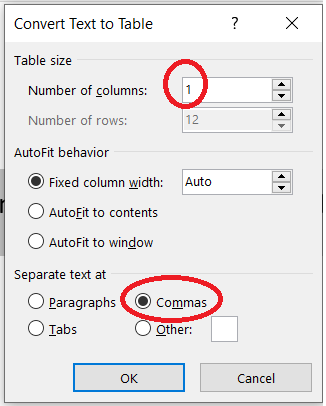
... select the list and use Word's text to table conversion to create a table with one column with a different country on each row. You will need to choose "1" in the Number of columns box, and to separate the text at "Commas" in this example.
Picture
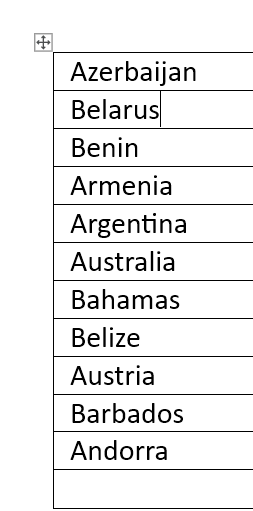
This will give you a table that looks something like this:
Picture
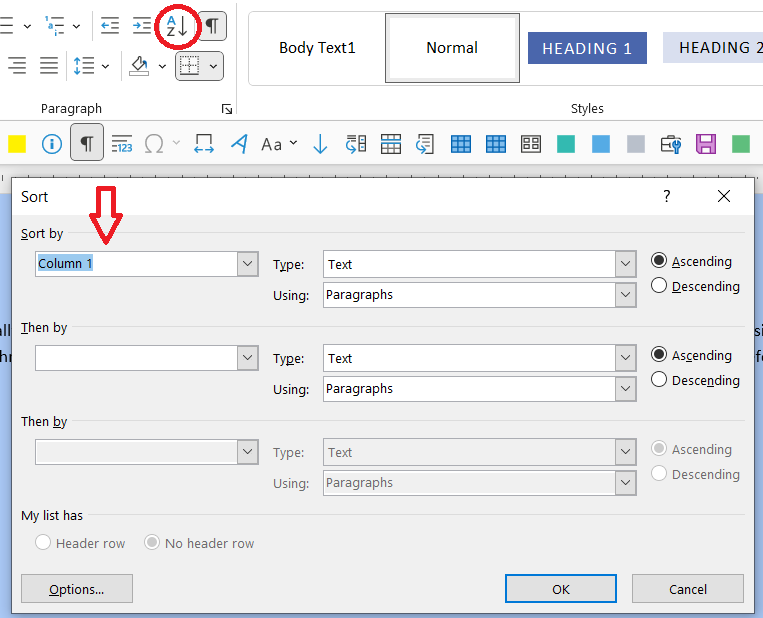
Then, use Word's sort function to sort this column into alphabetical order, running from the top to the bottom. You will need to select Sort by 'Column 1' (ascending order is selected automatically) ...
Picture
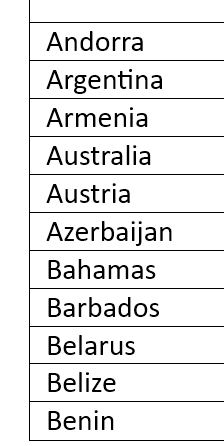
... and your table will end up looking like this ...
Picture
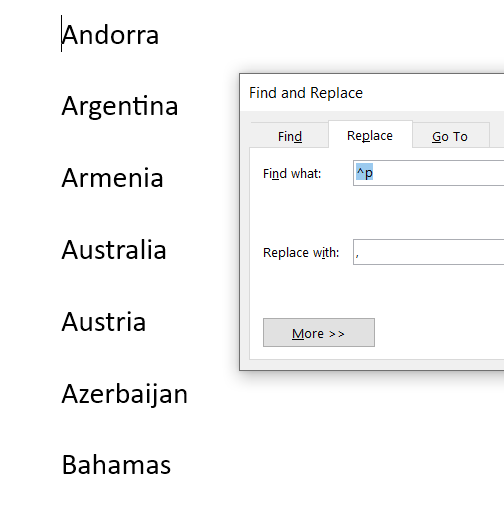
Use the "Convert table to text" function to convert the table back to text. Unfortunately, I don't think that it's possible to go straight from this type of table to a list of words separated by commas, so search for paragraph marks and replace with a comma and a space ...
Picture
... ​to recreate your list.
Picture
The sort function will also sort in reverse order, or numerically, if you want it to.

If you're feeling brave, you can record these steps in a macro and assign a keyboard shortcut or create a shortcut on the Quick Access toolbar.


Author

Andrea at Yours Truleigh Editing.
www.yourstruleighediting.com
​
​

Picture

Archives

January 2026
September 2024
November 2023
December 2021
October 2021
August 2021
July 2021
June 2021
March 2021
February 2021
January 2021
December 2020


Categories

All
Advanced
Beginner
CIEP
CIEP Conference
Editorial Training
EndNote
Intermediate
Macro Baby Steps
Macros
Music
PDF
PerfectIt
StetSwim
Time Off
Word Basics
Word Styles
Working With Word


Share

0 Comments

Your comment will be posted after it is approved.


Leave a Reply.

Details

    Author

    Andrea at Yours Truleigh Editing
    I'm an editor based on the south coast of the United Kingdom. I use Word tools to make the editing process as effiicient and accurate as possible, and I'm hoping to share some of the tips and techniques I've picked up along the way. I'm an enthusiastic and grateful member of the Chartered Institute of Editing and Proofreading. Editorial freelancers benefit hugely from being part of supportive organizations:  for direct support for our work, such as training and providing routes for our clients to find us, but also for community, which is needed now more than ever. 
    Please note: all Word tips are based on Word 365 for PC. 

    Archives

    January 2026
    September 2024
    November 2023
    December 2021
    October 2021
    August 2021
    July 2021
    June 2021
    March 2021
    February 2021
    January 2021
    December 2020

    Categories

    All
    Advanced
    AI
    Beginner
    CIEP
    CIEP Conference
    Editorial Training
    EndNote
    Intermediate
    Macro Baby Steps
    Macros
    Music
    PDF
    PerfectIt
    StetSwim
    Time Off
    Word Basics
    Word Styles
    Working With Word

    RSS Feed

Dr Andrea Kay
​Medical Editor | ​Yours Truleigh Editing

© COPYRIGHT 2026. ALL RIGHTS RESERVED.
  • Home
  • Services
  • Portfolio
  • Testimonials
  • Contact
  • Blog
